AVLite Documentation
AVLite is a lightweight, extensible autonomous vehicle software stack for rapid prototyping, research, and education. It provides clean abstractions for perception, planning, and control while supporting multiple simulators through a unified interface.
ROS2 & Autoware Ready
AVLite includes a built-in ROS2 executor extension (executer_ROS2) with native Autoware message support. Publish and subscribe to autoware_auto_msgs types like Trajectory and ControlCommand out of the box.
Repository: github.com/AV-Lab/avlite
Features
- Modular Architecture: Swap perception, localization, planning, and control algorithms at runtime
- Multi-Simulator Support: Works with BasicSim (built-in), CARLA, Gazebo, and ROS2
- ROS2 & Autoware Integration: Built-in extension for ROS2 with native Autoware message types
- Optional Perception & Localization: Both perception and localization are optional — run with ground truth or plug in your own strategies
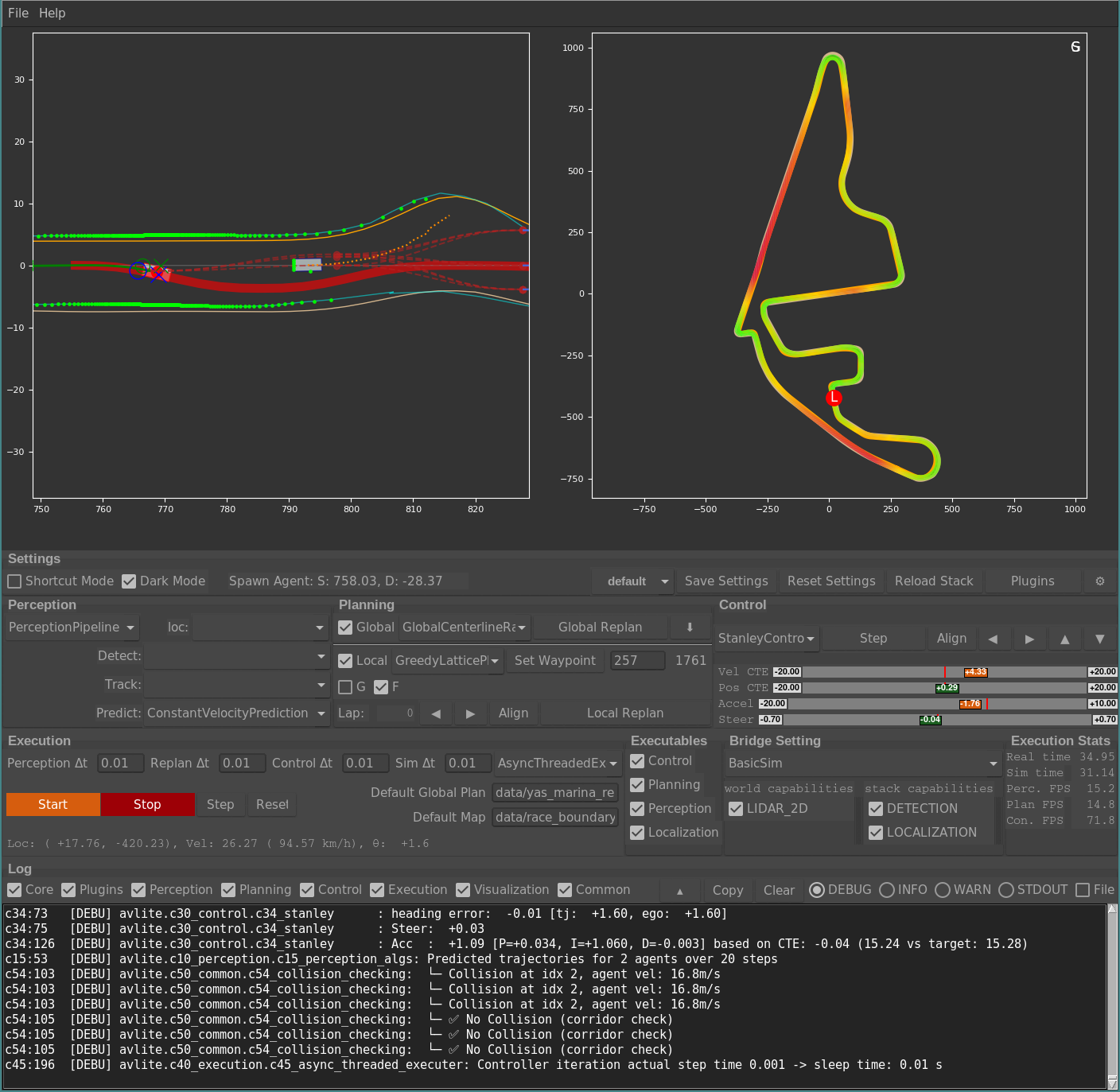
- Real-time Visualization: Tkinter-based GUI for monitoring and debugging
- Hot Reloading: Modify code without restarting the application
- Plugin System: Extend functionality with community plugins
- Profile Management: Save and load different configurations
Installation
Minimal (core only)
git clone https://github.com/AV-Lab/avlite.git
cd avlite
pip install -r requirements-minimal.txt
Full (includes joystick, dev tools, docs)
pip install -r requirements-full.txt
Optional Integrations
- CARLA: Install from CARLA releases
- ROS2 + Autoware: Install ROS2 (Humble/Iron/Jazzy) and optionally
autoware_auto_msgsfor native Autoware message support. The built-inexecuter_ROS2extension provides:ROSExecuter: Synchronize AVLite with ROS2 ecosystemPlannerNode: Publishes Autoware Trajectory messagesControllerNode: Publishes Autoware ControlCommand messagesPerceptionNode: Publishes ego state and tracked objects- Message converters for seamless Autoware integration
Quick Start
1. Launch the Application
python -m avlite
2. Using the GUI
- Config Tab: Select a profile or create a new one
- Start Stack: Click "Start/Stop Stack" to begin simulation
- Spawn NPCs: Right-click on the plot to add vehicles
- Adjust Parameters: Modify settings in real-time through the GUI panels
3. Basic Workflow
Load Profile → Configure Components → Start Stack → Monitor/Debug → Save Profile
4. Headless Mode (no GUI)
For deployments on a robot, server, or CI runner, run AVLite without the Tkinter GUI using the same YAML profiles you saved from the visualizer:
# Default profile
python -m avlite headless
# Pick a saved profile
python -m avlite headless -p my_robot_profile
python -m avlite headless my_robot_profile # positional shortcut
# Tune log noise / loop rates
python -m avlite headless -p my_robot_profile \
--log-level WARNING \
--control-dt 0.01 --replan-dt 0.5 --perceive
A live rich dashboard shows FPS, ego state, lap counter, and recent log
lines. Press Ctrl+C to stop. Requires pip install rich.
Recommended workflow
- Configure with
python -m avlite— pick the bridge, strategies, and tune parameters in the GUI. - Save the result as a named profile from the Config tab.
- Deploy with
python -m avlite headless -p <profile>on your robot or server. The same YAML profile drives both modes, so what you see in the visualizer is what the robot will run.
Community Plugins
AVLite has a community plugin system that lets anyone publish perception, planning, control, executer, or world-bridge strategies as a small Git repository.
Browse and install (GUI)
python -m avlite plugins
The browser fetches the official registry from
avlite-community-plugins,
lets you install/uninstall plugins, and (de)registers them with the
active profile. Installed plugins live under
$XDG_DATA_HOME/avlite/plugins (or ~/.local/share/avlite/plugins);
override with the AVLITE_PLUGINS_DIR environment variable.
Publish your plugin
- Build a plugin following the Plugin Development Guide.
- Push it to a public Git repository.
-
Fork avlite-community-plugins and add an entry to
plugins.yaml:plugins: - name: my_cool_planner repository: https://github.com/<you>/my_cool_planner version: latest # or a tag/commit SHA description: One-line summary author: Your Name -
Open a pull request. Once merged the plugin appears automatically in every user's
avlite pluginsbrowser.
Core Components
| Component | Description |
|---|---|
| c10_perception | Interfaces for detection, tracking, prediction, localization (optional), mapping |
| c20_planning | Global planning (A*, HD maps) and local planning (lattice-based) |
| c30_control | Vehicle controllers (Stanley, PID) |
| c40_execution | Execution orchestration, simulator bridges (BasicSim, CARLA, Gazebo) |
| c50_visualization | Real-time Tkinter GUI with multiple plot views |
| c60_common | Settings management, utilities, capability definitions |
Configuration
AVLite uses YAML-based configuration with profile support. Configuration files are in the configs/ directory:
c10_perception.yaml- Perception settingsc20_planning.yaml- Planning parametersc30_control.yaml- Controller tuningc40_execution.yaml- Execution and simulator settingsc50_visualization.yaml- GUI preferences
Example: Switching Simulators
In the GUI Config tab, change the Bridge dropdown:
- BasicSim - Built-in 2D simulation (no external dependencies)
- CarlaBridge - Connect to a running CARLA simulator (bridge_carla extension)
- GazeboIgnitionBridge - Connect to Gazebo Ignition via ROS2 (bridge_gazebo extension)
- ROS2WorldBridge - Use a ROS2 topic-based world bridge (bridge_ROS2 extension)
Project Structure
avlite/
├── c10_perception/ # Perception interfaces
├── c20_planning/ # Planning algorithms
├── c30_control/ # Control strategies
├── c40_execution/ # Execution and bridges
├── c50_visualization/ # GUI components
├── c60_common/ # Shared utilities
└── extensions/ # Built-in extensions
├── bridge_carla/ # CARLA simulator bridge
├── bridge_gazebo/ # Gazebo Ignition bridge
├── bridge_ROS2/ # ROS2 world bridge
├── executer_ROS2/ # ROS2 executor with Autoware msgs
└── multi_object_prediction/ # Multi-object prediction
Modules use numbered prefixes (c10, c20, etc.) for easy navigation. Search for "c23" to find local planning, "c34" for Stanley controller, etc.
Documentation
- Architecture - System design and patterns
- Plugin Development - Create custom components
Support
- Issues: GitHub Issues
- Discussions: GitHub Discussions
License
See the repository for license information.